

Eyes Recovery Password,Can You Reset It Without Deleting Pictures?
On Snapchat, all of us have certain photos and videos that we want to keep hidden from everyone. For this, Snapchat’s My Eyes Only MEO feature is the best option because it locks your personal data behind a 4 digit passcode.
But what happens if you forget your My Eyes Only Password? If you’re staring at your phone right now with your heart pounding because you can’t remember your passcode, you’re not alone this is one of the most common frustrations Snapchat users run into, especially since so many people store their most personal Memories inside this feature.
There are many fake videos and websites on the internet that claim they can recover your password without deleting your data. Today in this article, I’ll tell you the complete truth about Snapchat My Eyes Only Password Recovery and the correct step by step process to reset it.
What Is My Eyes Only?
Quick Primer
If you’re new to this feature, here’s a quick overview before we go further. My Eyes Only is a folder inside Snapchat’s Memories section, protected by its own separate passcode, where you can hide specific snaps, photos, and videos so they don’t show up in your regular gallery or Memories feed. You can access it by swiping up from the camera screen into Memories, then tapping the My Eyes Only tab and entering your passcode.
The Biggest Truth About My Eyes Only
The Encryption Privacy
First, it’s very important to understand one key thing. Snapchat secures your My Eyes Only data through AES encryption. This means that the passcode you set is known only to you. Not even Snapchat’s support team or their servers have access to your password.So, if you forget your passcode, there is no safe way for Snapchat to unlock your photos for you
Forgot Your Snapchat Login Password Too
Reset That First
Before you can even attempt the My Eyes Only passcode reset, you need your main Snapchat account password (the one you use to log in). If you’ve forgotten that as well, here’s how to get it back .
- Go to the Snapchat password reset page at accounts.snapchat.com/accounts/password reset request.
- Enter the email or phone number linked to your account and click Submit.
- If you choose email, check your inbox for a verification email from Snapchat and tap the reset link inside it. If you choose phone, Snapchat will text you a six-digit verification code.
- After verifying, type in your new password twice and click Save to finish.
Once your login password is sorted, you can move on to resetting your My Eyes Only passcode below
Snapchat My Eyes Only Passcode Reset
Official Method
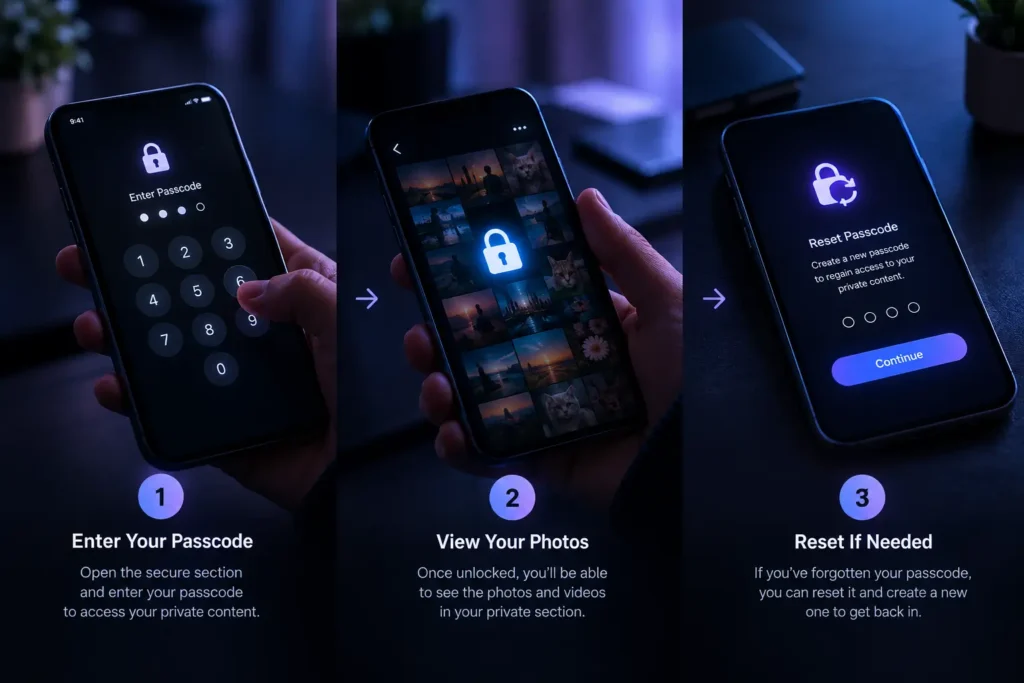
If you’re willing to lose your old data and want to set a new password, you can follow this official method.
- Open your Snapchat app and swipe up to go to Memories.
- From the tabs at the top, click on My Eyes Only.
- When asked to enter your passcode, click on the Options button on the bottom right.
- Now tap “Forgot Passcode.”
- Enter your Snapchat account Password (the one you use to log in) and click Next.
- Snapchat will show you a warning: When you create a new passcode, all snaps in My Eyes Only will be deleted. If you agree, tick the checkbox and click Continue.
- Now you can set your new 4-digit passcode.
“Change Passcode” vs. “Forgot Passcode”
Know the Difference
Snapchat actually gives you two different options inside My Eyes Only settings, and it’s worth knowing which one applies to you:
Change Passcode
use this only if you still remember your current passcode but simply want to switch to a new one. This option keeps all your existing snaps safe; nothing gets deleted. Go to My Eyes Only > Options > Change Passcode, enter your current code, then set and confirm a new one.
Forgot Passcode
use this if you genuinely cannot remember your current passcode. As covered in Official Method above, this wipes everything inside My Eyes Only permanently and starts you fresh.
Knowing this distinction matters a lot of users panic and use “Forgot Passcode” out of habit when they actually still remember their code, unnecessarily losing all their hidden snaps.
How Is Recovery Possible Without Deleting Data?
Method 2: Secret Workaround
Many users ask, “Is there really no other way?” There is one trick, but it only works if you had a certain setting turned on beforehand.
Trick: Check Your Cloud Backup / Device Gallery
When you add a photo to My Eyes Only, some phones (especially Android or devices with automatic iCloud backup) save a temporary cached copy or backup of that photo in a folder.
Google Photos / iCloud:
Check the ‘Trash’ or Archive folder in your Google Photos or iCloud account. Many times, people delete the snap from the gallery after saving it, but a backup remains on the cloud.
Snapchat Data Download:
You can go to snapchat.com and request My Data. Because of encryption, My Eyes Only photos aren’t included in this, but if a photo accidentally stayed in your basic Memories due to an app glitch, you might find it there.
Some Myths About My Eyes Only To Save Your Time
Before wasting your time, keep these things in mind
❌ Third-Party Apps & Websites:
There is no app on the internet (like Snapchat Pro Mod or any “recovery tool”) that can bypass My Eyes Only. Such apps can steal your data or get your account banned. Be especially wary of YouTube tutorials or ads promising a 100% working MEO password recovery trick these are almost always scams designed to steal your login credentials or push malware, not genuine solutions.
❌ Contacting Snapchat Support:
If you email Snapchat Support asking them to give me back my passcode, you’ll get an automatic reply saying they cannot do that for security reasons.
Future Safety Tips: How to Always Keep Your Data Safe
If you’ve lost your data this time, make sure to keep these things in mind going forward:
Use a Passphrase Instead of a Quick Code:
Instead of a 4-digit PIN, go to Options and choose an alphanumeric password (a combination of letters and numbers) that you’ll remember easily.
Use a Password Manager:
Note down your My Eyes Only password somewhere safe, like Google Password Manager or a personal diary.
Double Backup:
Don’t rely on Snapchat alone for very important photos keep a backup on a secure drive or personal pen drive as well.
Turn On Save to My Eyes Only by Default:
To avoid the hassle of manually moving snaps every time, you can set Snapchat to automatically save every new snap directly into My Eyes Only. Go to your Bitmoji icon (top left) > Settings > Memories, then toggle on Save to My Eyes Only by Default. This way, your private content stays protected automatically going forward.
Tips and Tricks to Avoid Getting Locked Out Again
- Write your passcode down the day you set it don’t rely on memory alone, especially for a code you’ll only enter occasionally.
- Test your passcode after setting it close My Eyes Only completely and reopen it right away to confirm the code works before you trust it with sensitive content.
- Never share your passcode even with close friends or partners, since anyone with the code has full access to everything inside.
- Keep your device backup (iCloud/Google) turned on while it won’t restore MEO photos specifically, having a general backup habit can save other Memories if something goes wrong.
- Set a reminder to update your passcode occasionally and each time you do, immediately save the new one somewhere safe rather than trusting yourself to remember it.
Frequently Asked Questions
Q1. Can Snapchat see or access my My Eyes Only snaps?
No. My Eyes Only content is protected by AES encryption, and Snapchat’s own team and servers do not have access to your passcode or your hidden snaps.
Q2. Will I lose my snaps if I reset my My Eyes Only passcode?
Yes. Using “Forgot Passcode” permanently deletes everything currently stored in My Eyes Only. There is no official way around this it’s built into how the encryption works.
Q3. What’s the difference between “Change Passcode” and “Forgot Passcode”?
“Change Passcode” is for when you still remember your current code and just want a new one it keeps your snaps safe. Forgot Passcode is for when you can’t remember your code at all, and it wipes everything.
Q4. Is there any legitimate app or website that can recover a lost My Eyes Only passcode?
No. Any app, tool, or website claiming to bypass or recover your My Eyes Only passcode is not legitimate and could put your account or data at risk.
Q5. Can I prevent this from happening again?
Yes using a memorable passphrase, storing your passcode in a password manager, and turning on Save to My Eyes Only by Default are the most effective ways to avoid getting locked out in the future.
Conclusion
As excellent as Snapchat’s My Eyes Only is for privacy, it’s just as strict when you forget your password. If you’ve forgotten your passcode, setting a new one will definitely delete your old data. So always keep an easy but secure password.
How did you find this information? Were you able to recover your data? Be sure to let us know in the comments, and don’t forget to check out the other articles on our website, Snapchat Pro!